
Testing cameras I don't own
Redlamp can open raw files from 1,258 cameras, and its tests check 25 of them. This is how I'm trying to close that gap, with help from the people who own the rest.
· Pedro
Shortly after the first release, someone asked whether Redlamp handles Hasselblad raws. Good question. I don't own a Hasselblad, and I don't know anyone who owns a modern one (the X2D is 100 megapixels, so I'd quite like to).
That time I got lucky. raw.pixls.us collects sample raws that people give away under CC0, and it had files from the X1D II and the X2D. They went into Redlamp's tests, which now check them on every change, so for those two, at least, the answer is now yes.
But it got me thinking about all the other cameras. Redlamp reads raw files through LibRaw, an open-source library that knows about 1,258 of them. When I put together the cameras page for the website, I had to count how many of those Redlamp's tests actually cover: 25.
25 out of 1,258. And I own one camera.
The problem
LibRaw reading a camera's files isn't the same as Redlamp getting them right. LibRaw unpacks the sensor data and the metadata, and everything after that is on Redlamp: the black level, where the highlights clip, the color matrix that turns the sensor's idea of color into ours, the crop, which way up the photo goes. Every camera has its own quirks, and when one of them is wrong you notice it - milky shadows, magenta highlights, a thin black strip down one side, or colors that are just slightly off.
To make it more interesting, a camera isn't really one camera. The same body can write compressed, lossless or uncompressed raws, at 12 or 14 bits, sometimes with a crop mode on top, and each of those can take a different path through the decoder. Nikon's High Efficiency raws, for example, don't open in Redlamp yet (LibRaw can't read them), while the lossless files from the very same cameras do.
If you shoot professionally, this matters immensely. You want to know your camera works before you trust an editor with a job, not after.
I can't buy 1,233 cameras, and I'm not going to ask strangers to post me their memory cards. So how do you test a camera you don't own?
How I thought about it
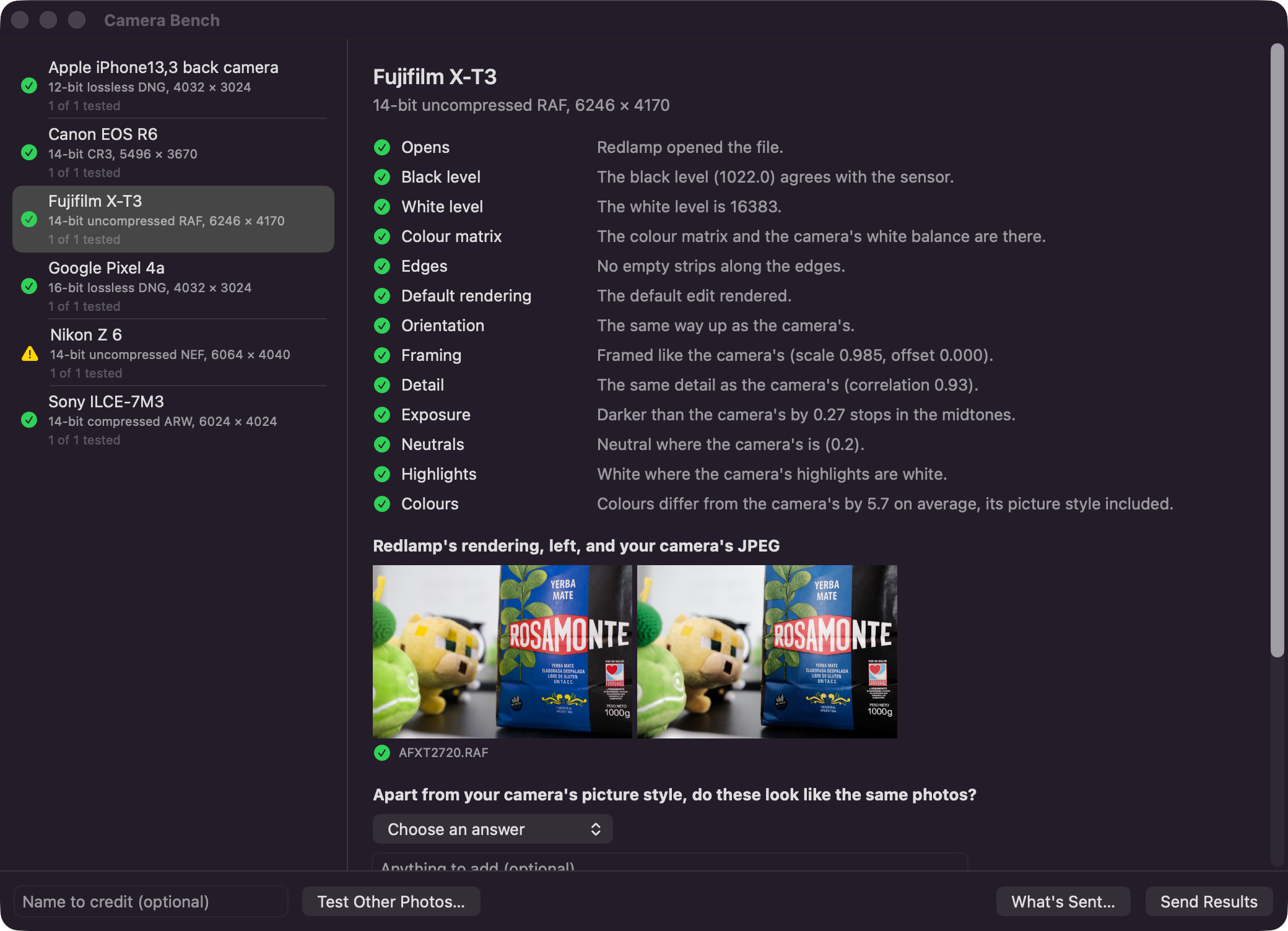
My first thought was a bench: a small tool anyone could run on their own photos. You wouldn't have to tell it which camera or lens you used, since that's already in the files. It would run a bunch of checks, you'd submit the results, we'd gather them somewhere, and over time each camera would build up a confidence score until I could call it verified. Ideally it would come bundled with Redlamp, because anyone willing to try it already has the app.
Most of that survived. A few parts changed quite a lot once I started thinking it through.
The first problem was what to compare against. To know whether Redlamp renders a photo correctly, you need to know what correct looks like, and for a camera I don't own, I don't.
Turns out, the camera does. Almost every raw file has a JPEG tucked inside it, the preview the camera rendered itself, the one you see on its screen. It isn't a perfect reference: it has the camera's picture style baked in, sometimes its lens corrections too, and it's small. But it's essentially the camera telling you which way up the photo goes, how it's framed, how bright it should be, what's neutral and where the highlights are. If Redlamp disagrees with the camera on any of those, something is probably wrong, and I suspect it's usually on my side.
Some checks don't need a reference at all. Most sensors have a border of photosites that never see light, so they show what black really is, and if the file claims something else, the shadows will be off. A missing color matrix means the colors can't be right. A dark strip along one edge means the crop is wrong.
Then there was the question of whether people should send me their photos. I went back and forth on this one. Having the raw files would make debugging so much easier. It would also mean storing other people's photos, worrying about whether they're allowed to share them and dealing with whatever gets uploaded, and I don't think most people want to hand their photos over to someone else's project anyway.
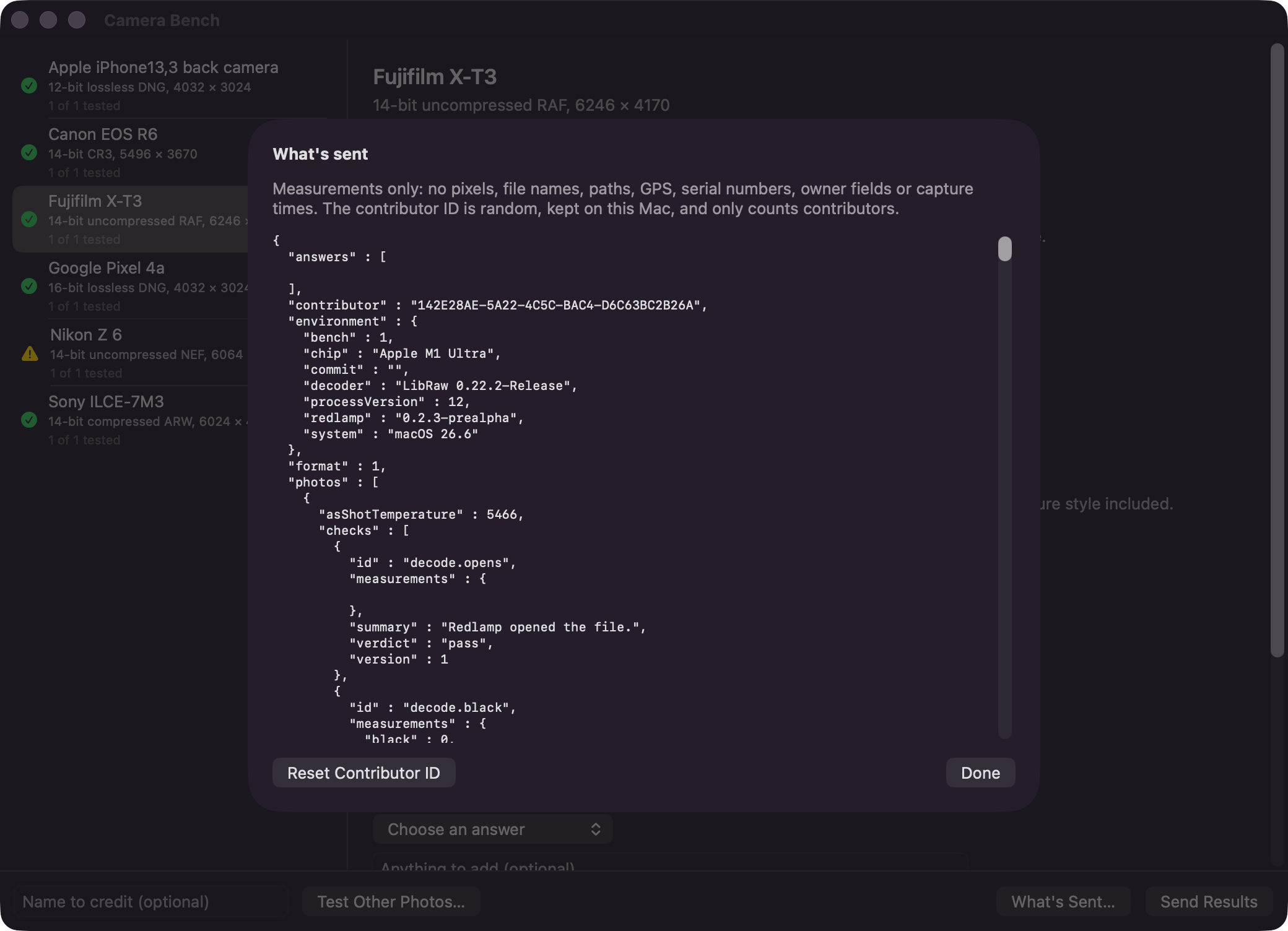
So the bench only sends measurements. No pixels, no file names, no GPS, no serial numbers, no capture times. Before anything is sent, you can see the whole report, down to the last number.
If you do want to give a photo away, raw.pixls.us is still the place for it, and it's still how a camera gets into Redlamp's tests.
I also didn't want to run a backend - no database, no accounts, nothing to look after at 2am. Redlamp's bug reporter already sends reports through redlamp.app, which files them as GitHub issues, so the bench does the same: each report becomes a small JSON file in a private GitHub repository. A script reads them all and writes the summary the cameras page is built from. It's not clever, but there's nothing new to run, and every result keeps its history.
The confidence score is the part I changed my mind on. A score is easy to calculate and hard to read. If a camera sits at 0.8, what's missing? Who's going to go and take the photo that gets it to 0.9?
So each camera and raw mode gets a checklist instead:
- Reported working: one photo opened with nothing failing.
- Tested by photographers: three people have sent ten photos between them, covering base and high ISO, a portrait frame, clipped highlights and warm light. No more than one photo in ten fails a check, and at least two answers say Redlamp's rendering and the camera's look the same.
- Problem reported: two people see the same failure, or someone says the photos look different.
- Verified: still a CC0 sample in the tests.
A nice side effect is that the bench can tell you what your camera still needs. If nobody has sent a high ISO shot from it yet, it'll say so. These rules are a first guess, and I fully expect to change them once real results start coming in.
What it looks like today
In Redlamp, Help › Test Your Camera… opens the bench. Point it at a folder of raws, or just a few files, and it does the rest: it works out the camera and raw mode of each file, picks up to eight photos per mode, runs the checks and puts Redlamp's rendering next to the camera's. Then it asks you one question: apart from your camera's picture style, do these look like the same photos?
There's a step-by-step guide with screenshots on the Test your camera page. The whole thing, from my first message about it to a working bench, took about a day, with agents writing the code.
Testing the tester
Before asking anyone for help, I wanted to know whether the checks were any good, so I tried to break them. The bench has to pass every camera Redlamp already verifies (it does), and it has to catch problems I cause on purpose: a photo turned the wrong way, the color filter pattern read one column off, a black level set too high, a white level three stops too high, a green channel a third too dark. It catches all five.
Then I ran it myself over raw.pixls.us: one CC0 file for almost every camera the tests don't cover, downloaded one at a time and deleted straight after. That's 820 photos in 742 camera and raw modes. 675 opened with nothing failing, and 65 had a problem. Some of what it found:
- The Leica M Monochrom and the Pentax K-3 Mark III Monochrome don't open at all. Their sensors have no color filter, and Redlamp has no path for that yet.
- The Nikon Z50 II and Z5 II are newer than the LibRaw that Redlamp ships with, and instead of being refused, they decode as colored noise.
- Twelve older Fujifilm cameras, the SuperCCD ones, crash the decoder.
- A Canon EOS D30 file that doesn't say what white balance it was shot at comes out orange.
- A few newer Fujifilms have a 12-pixel dark strip down the right-hand side.
- A Leaf Aptus 22 file renders a quarter turn off.
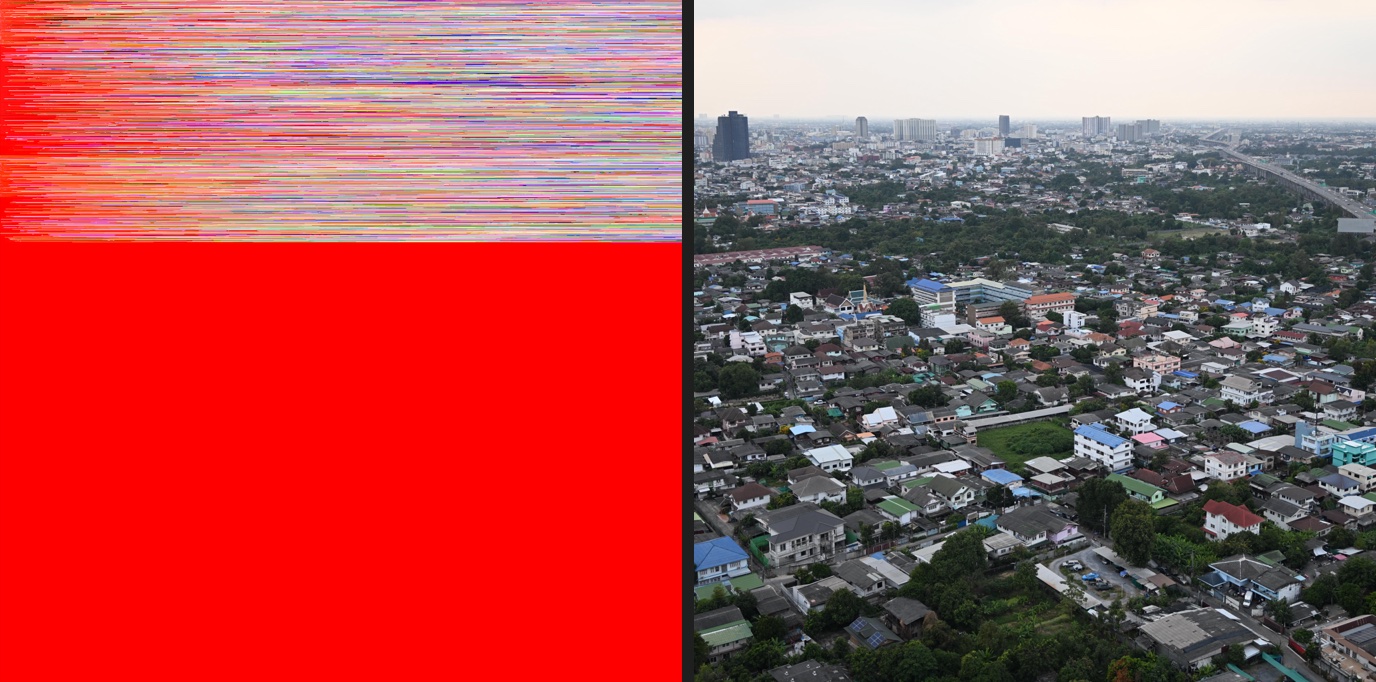
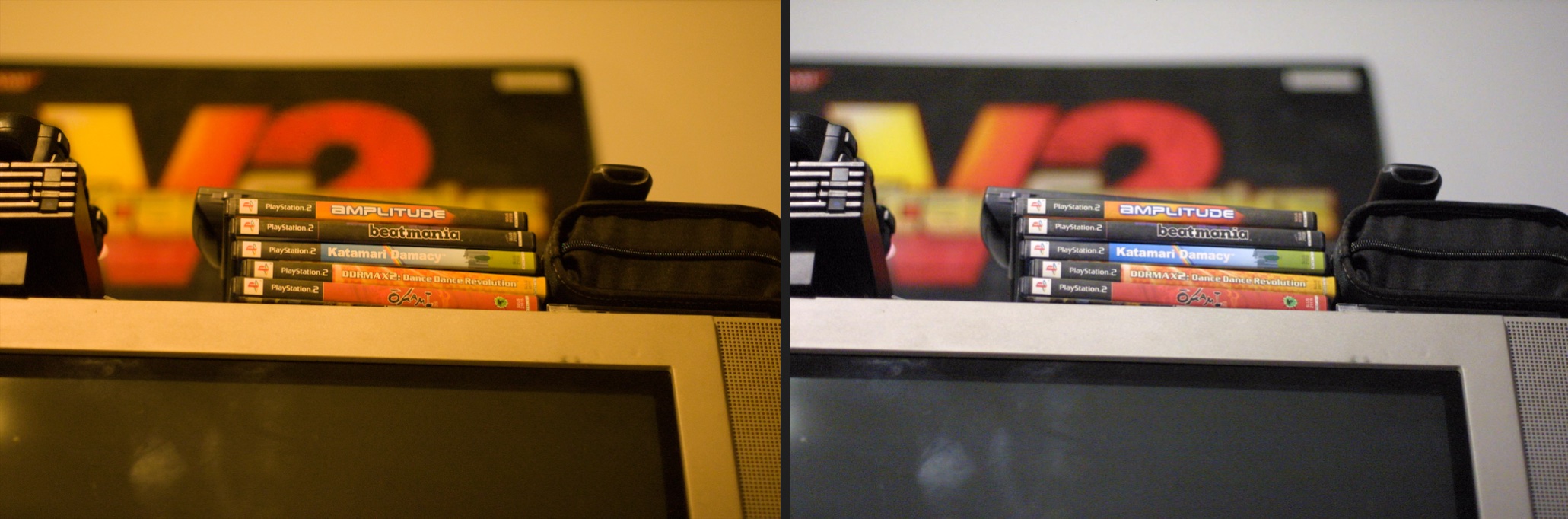
None of these were on my radar, and they're all on the tracker now (CAM-20 to CAM-26).
It got a few things wrong too, which was just as useful. Canon PowerShots running CHDK, a community firmware, write their bad pixels as zeros, and the black level check took that for a sensor problem. 360° cameras leave the edges of the frame black on purpose. Some cameras fill their masked border with zeros. Each of those changed a check. Every check has a version, so older results either get judged again from the numbers they recorded or stop counting.
How you can help
The bench ships with Redlamp 0.2.4. Once you have it, open Help › Test Your Camera…, point it at a folder of raws and send the results. It takes a few minutes and works with photos you already have, but these help the most: one at base ISO, one at ISO 3200 or higher, a portrait frame, something with clipped highlights, something under warm indoor light, and one in each raw mode your camera offers.
If something looks wrong, Report This Problem opens a bug report with everything the bench found already filled in, so you only need to describe what you saw. And if you're happy to give a photo away, upload it to raw.pixls.us under CC0 and open an issue with a link to it. That's how the Hasselblads got in.
Thanks for reading,
Pedro