
How I run a feature too big for one chat
Redlamp's library is the largest thing it has taken on, built by a string of AI agents, each in a chat of its own. This is how I keep track of it without reading their transcripts, and the skill you can borrow to do the same.
· Pedro
Redlamp is a raw photo editor for the Mac that I'm building with AI agents. I decide what gets built, try it and review it; agents in Cursor, each working in a chat of its own, write most of the code. Until now Redlamp has been an editor. You open a folder of photos and develop them, and each photo's edit is saved in a small file beside it, called a sidecar.
This morning I asked for a library: the part of a photo app where you rate, flag, keyword and search your photos, which Lightroom Classic calls its Library module. I wanted it to work for the libraries professional photographers actually keep. Those run to hundreds of thousands of photos, sometimes millions, on spinning disks and network storage as well as SSDs. Search should answer as you type, and holding down an arrow key should fly through the photos.
A feature that size doesn't fit in one chat. It's dozens of separate pieces of work, with a research study and performance tests of its own, and agents working on it one after another, each in its own chat. No single chat holds the whole picture, and I can't read every transcript to find out where things stand. By the end of the first day, eleven agents had worked on it and a twelfth was running.
This post is about how I keep a feature like that on track:
- a plan;
- a single list of all the work;
- a board I can read in a minute;
- a few rules that keep the board honest.
How the library itself is built gets its own series once it's done: its speed targets, its test data and its benchmarks.
Start with a plan, and only the questions that change it
Cursor has a plan mode, in which an agent can read the code and ask questions but can't change anything, and the request started there. Before writing a word of the plan, the agent found out what Redlamp already had. It sent three more agents to read different parts of the code at the same time:
- the panel that lists your photo folders (it lists 50,000 photos in a fifth of a second);
- the sidecar files;
- the command palette (a search box that runs any command from the keyboard);
- the keyboard shortcuts.
They came back with what the library could build on and what it lacked:
- There was no database anywhere.
- Ratings reached only the photo that was open, with no undo.
- Thumbnails were cached under each photo's file path, so renaming a photo lost its thumbnail.
Then it asked me two questions, the two whose answers would change the plan.
- Where should a photo's ratings, keywords and collections be stored? I chose the photo's own sidecar. A database is there only as an index for speed, and it can always be rebuilt from the sidecars. Other apps write ratings and keywords into a photo's metadata as XMP, the standard format they share. Redlamp reads those, but writes XMP for them only when I turn that on.
- Where does the library go on the roadmap? I chose to start now and ship its core in Redlamp 1.0.
Over the afternoon I added more, as messages while it worked:
- Performance had to be designed in from the start, with tests that prove it.
- People who use the mouse matter as much as people who use the keyboard.
- The library and the editor should be two modules of one window, as in Lightroom Classic, so switching between them is instant.
- I asked where the sidecar files should live, and how Lightroom handles that. I got a short comparison of Lightroom, Adobe Camera Raw, Capture One, darktable, RawTherapee and DxO PhotoLab before choosing. They go beside each photo by default, or in Redlamp's own folder on the Mac for folders it can't write to.
Each answer was recorded as a decision, with what was decided and why. The two I haven't made yet are recorded as well, marked as proposed: whether to index photos' GPS locations, and whether to read Lightroom Classic's catalog files to bring people's ratings and keywords across.
One list of all the work
Redlamp's roadmap is planned in one file, the research tracker. Every piece of planned work is a row in it, with an ID like LIB-06, a status and the commits that delivered it. Every open row has a matching GitHub issue, so the work can be followed in public. Decisions have rows too, numbered DEC-35 and so on.
Two scripts keep everything in step with the tracker. One creates and updates the GitHub issues from its rows. The other updates the roadmap in the README, and the comparison with Lightroom on this site.
So the plan became 35 rows, LIB-01 to LIB-35, and the script created issues #215 to #249. The 30 rows that make up the library's core are in the milestone for Redlamp 1.0. The other 5, the AI features and a map, come after 1.0.
The tracker is shared by every agent working on Redlamp, and that matters. While my plan was being written, another agent was researching a different feature: tethered shooting, where the camera is connected to the Mac and each photo appears as it's taken. It added its own decisions to the tracker and took the six decision numbers my plan had counted on, so the library's start at DEC-35 instead. It's a small thing, but it's why the tracker, and not any one chat, is where the truth lives.
The board
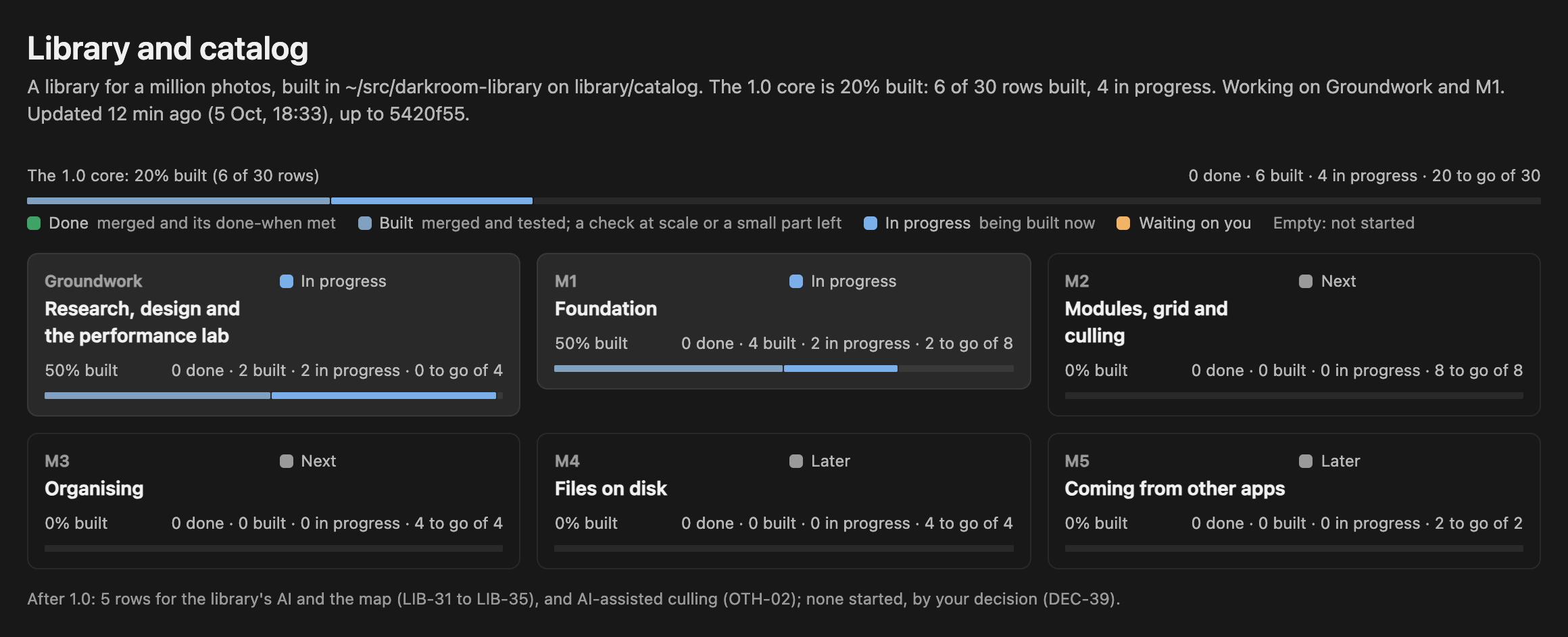
Cursor can show a canvas beside the chat: a small page, written in React by the agent, that the agent keeps updating as it works. Every line of work on Redlamp keeps one, so I can see where it stands without reading the conversation. For most work, a list of steps and a log is enough. For this one I wanted to see progress overall and for each milestone, like the production board I keep for another project, so the canvas became a board.
From the top, it shows:
- Overall progress: one bar across the 30 rows of the core, coloured by each row's state, then a tile for each milestone with a bar of its own. The milestones are:
- the groundwork: the research, the design and the performance tests;
- M1, the foundation;
- M2, the grid and culling (going through a shoot and keeping the best);
- M3, organising;
- M4, renaming and moving files on disk;
- M5, bringing libraries over from other apps.
- Now: what's being built at this moment, what's waiting on me and what's next, with buttons that open the design, the research findings, the tracker and the plan.
- Needs you: the things only I can do.
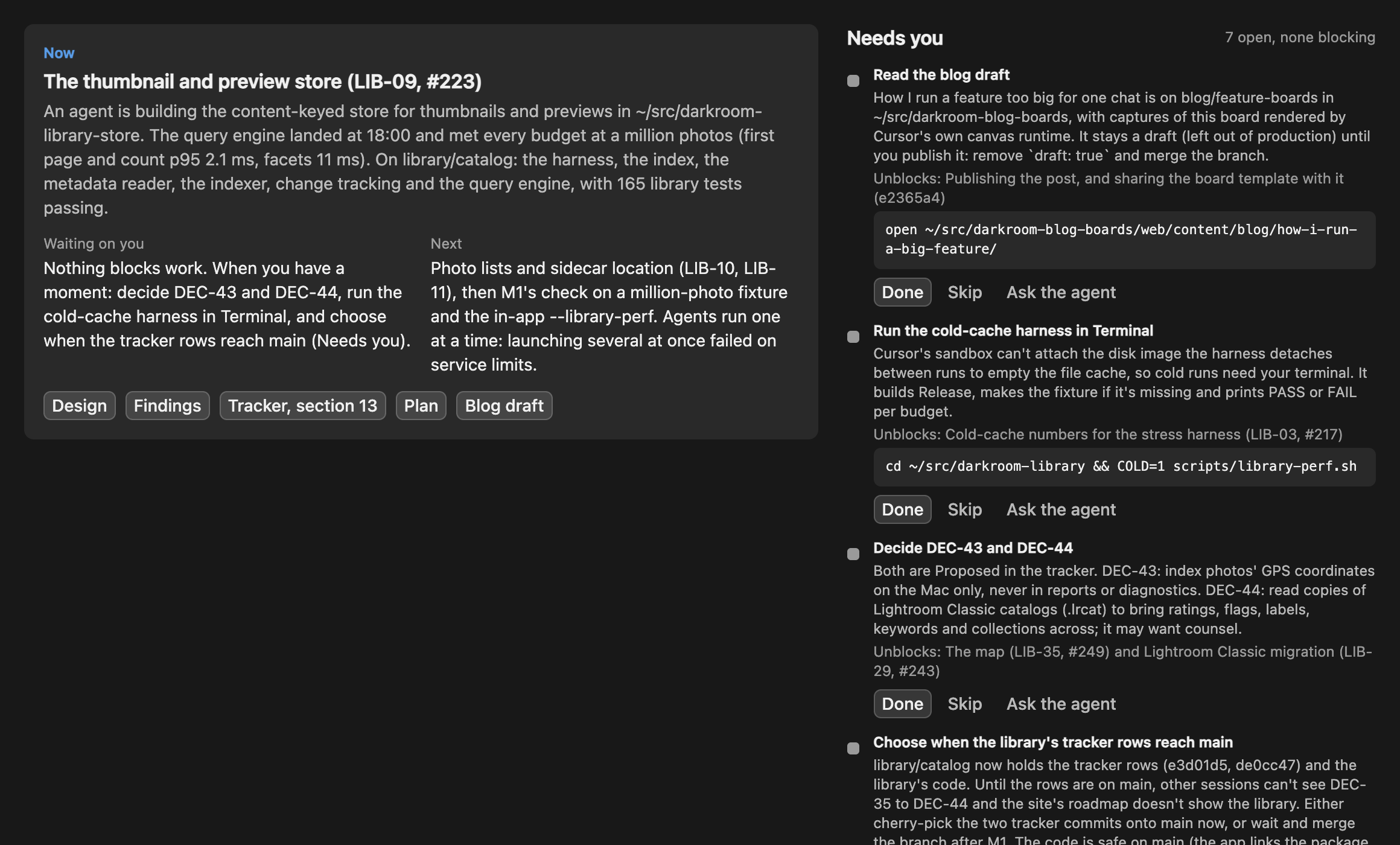
- Each milestone's rows: every row of the tracker with its state, a line on what's in and what's left, and a link to its GitHub issue.
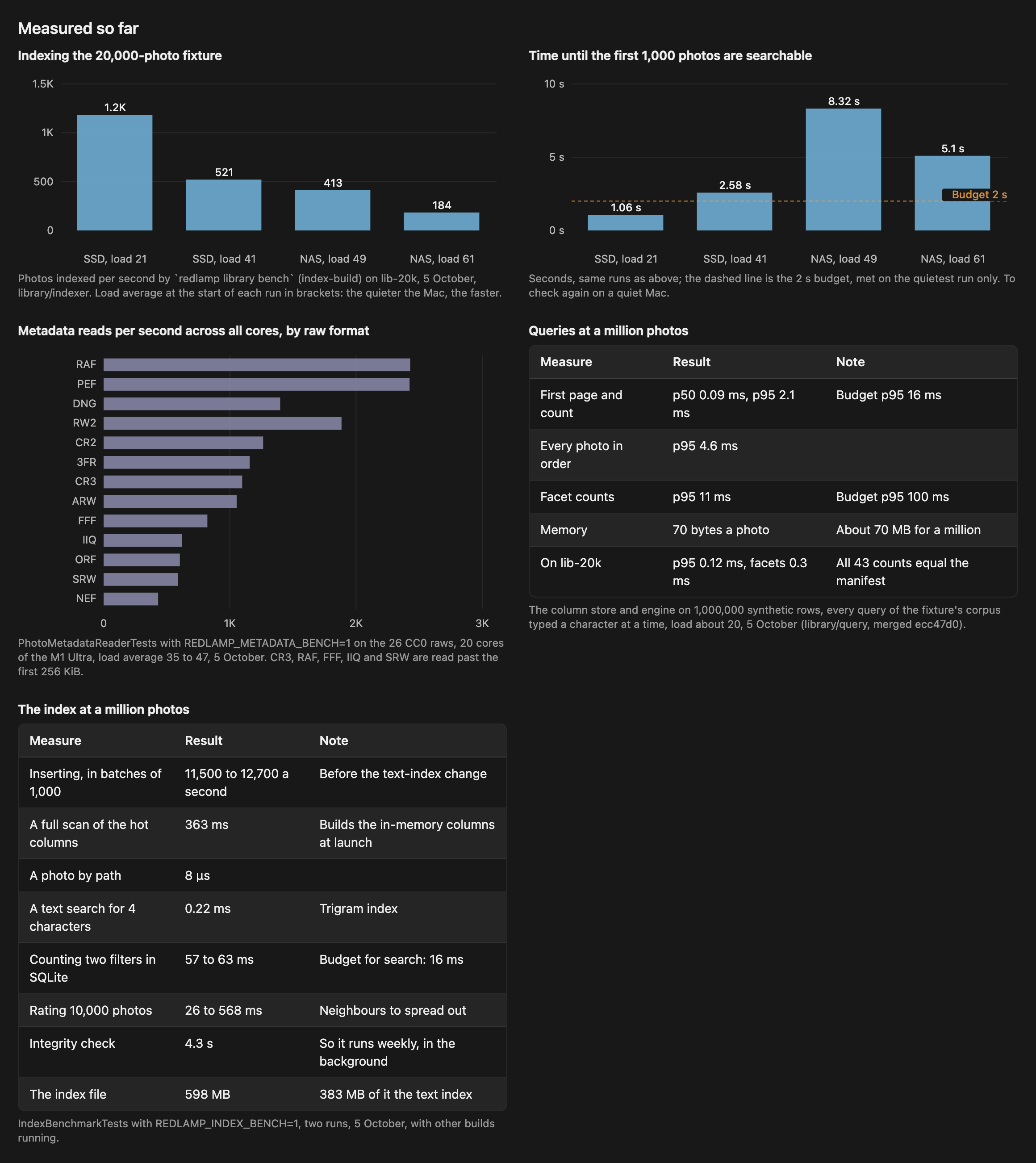
- Measured so far: charts and figures from the performance tests, each saying what it was measured against.
- Agents: every agent that has worked on the feature, how its work ended, and a button that opens its chat.
- The record: the plan's steps, a log of what happened, and every decision with its reason, folded away at the bottom.
Built isn't done
Each row has one of five states: done, built, in progress, waiting on me, or not started.
- Built means the code is merged into the library's branch and tested, but something is still to check. Usually that's a speed target at a million photos, or a small part that's left.
- Done means everything the plan says the row must do is true.
In the tracker, a row stays in progress until its code reaches Redlamp's main line of development, because marking it done closes its GitHub issue.
When I wrote this, six of the thirty rows were built and none was done. A headline of 0% done looks odd, but it's honest, and the bar shows the built rows beside it.
The same rule runs through the whole board: only what was checked goes on it. Commits come from git, test counts come from test runs, and every measurement says what it was measured against and how busy the Mac was at the time.
For example, the indexer is the part that reads every photo's details into the database. It has to make the first 1,000 photos searchable within 2 seconds. It managed that in one of four runs on a busy Mac, so its row says exactly that, and its chart draws the target as a line.
Needs you
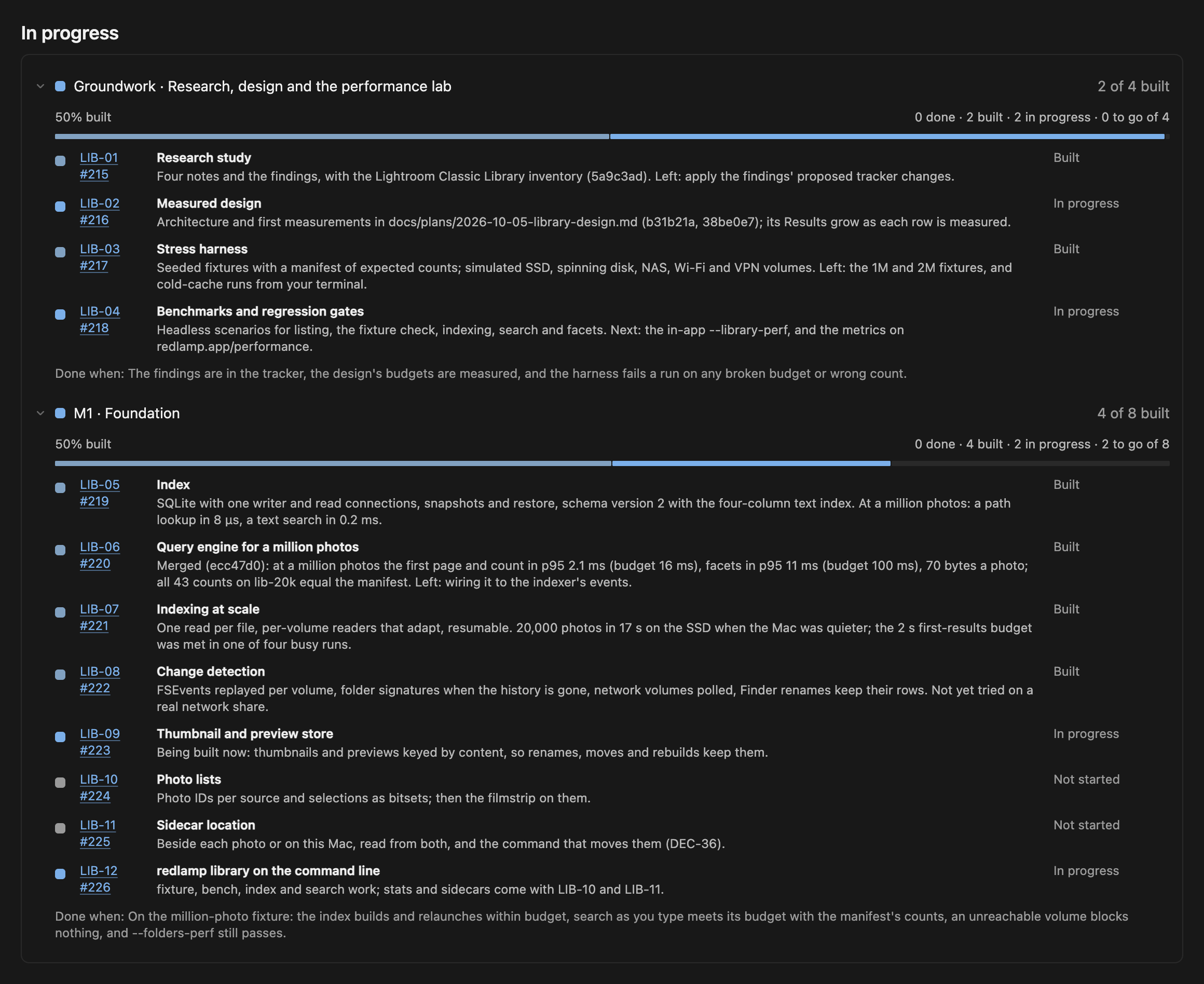
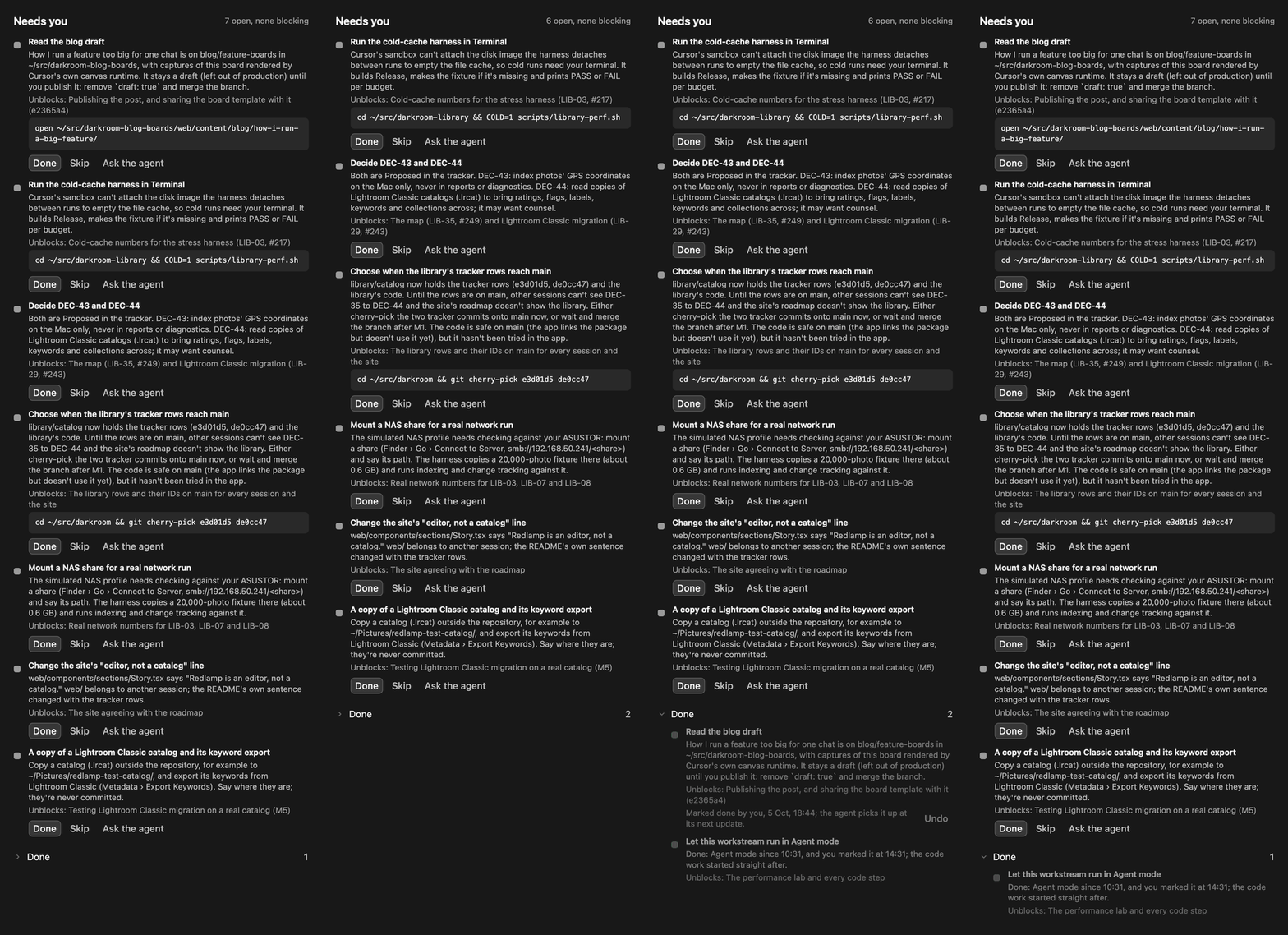
Needs you lists what only I can do. Each item is written so I can do it without opening the agent's chat. It says what it unblocks, and whether work is waiting on it. Today's are:
- Run the slowest benchmark myself. Measuring the library with the Mac's file cache emptied means mounting a disk image, which Cursor's sandbox doesn't allow. The item gives me the command to paste into Terminal.
- Make the two decisions still open: GPS locations, and Lightroom catalogs.
- Choose when the library's rows reach the main line. The library is being built on a branch of its own. Until that branch is merged, the rows exist only there, so other agents can't see them.
- Connect a network share. My NAS, a network drive at home, can show whether the simulated network numbers match a real share.
None of them is holding work up.
I answer on the board itself: Done, Skip, or Ask the agent, which opens a new chat with the board attached. The agent reads my answers the next time it updates the board.
Performance first
I said at the start that performance had to be designed in from the beginning, so the plan put the performance tests before any feature. They do three things:
- They make synthetic photo libraries of up to two million photos, with a list of exactly how many photos every test search must find.
- They can make a folder behave like a spinning disk, a network drive, Wi-Fi or a VPN, adding their delays.
- Their benchmarks end in PASS or FAIL against the targets.
The targets were on the board from the first hour:
- search results within 16 ms with a million photos, about one frame on a 60 Hz display;
- every action on screen within a frame;
- never a blank frame while an arrow key is held down.
The tests have already changed the design twice.
- The database. The first measurements showed SQLite, the database Redlamp uses, taking 60 ms to count the photos that match two filters among a million. That's four times the target. So the design also keeps the data searches need in memory, and the search engine built on it answers in 2.1 ms.
- The indexer. Its benchmark caught it taking 185 seconds to read a 20,000-photo test library. It reads each disk with several readers at once, but a bug left them waiting while each photo was parsed, so in practice it read one file at a time. With the fix, it takes 26 seconds.
Both are in the board's Measured so far, and both will be in the series.
A copy of the code of its own
Git lets one repository have several working copies at once, each on its own branch. The library is built in a copy of its own, so it doesn't collide with the other agents working on Redlamp at the same time. Redlamp's main line of development is merged into it at every step: it had moved on by 65 commits between the morning and the first merge.
Each agent building part of the library gets a working copy of its own too, and a list of the files it may change. The agent building the performance tests owns their folders, the agent building the database owns its own, and so on. A design document, written before any of them start, says which files belong to which part and how the parts talk to each other. So the agents agree on how the pieces fit before any code exists.
Not everything went to plan, and the board is where it showed.
- Too many agents at once. Twice, starting several agents together failed on a resource limit. One agent stopped halfway through its work, and another finished it from what the first had committed. Agents now run one at a time, and the board's Agents table says which one is running.
- An out-of-date copy of the tracker. The script that updates GitHub issues from the tracker would have reopened two issues that another agent had just closed. I was running it from the library's branch, whose copy of the tracker was an hour old. From the branch, it now updates only the library's own rows.
What it gives me
- I can tell where a feature this size stands in a minute, without reading a transcript.
- Decisions are a history. They're appended, never rewritten, each with its reason and who made it: me, a measurement or a sensible default.
- Anything that needs me is spelled out, with what it unblocks, so nothing waits on me without my knowing.
- Progress is measured against what the plan itself says done means, not against a feeling.
- Any agent can pick the work up from the board and the tracker, because neither depends on a chat's memory. So can I.
Borrow it
Agents in Cursor can follow skills: a folder of instructions, in a file called SKILL.md, with anything that goes with them. The skill behind the board is called workstream-canvas. It's in Redlamp's repository, and you can copy its folder into your own project's .cursor/skills/. It contains:
SKILL.md: when an agent keeps a canvas, what goes on it, and how it's kept up to date.template.tsx: the canvas for a single line of work.board-template.tsx: the board for a feature with milestones, the one in this post.capture.py: renders a canvas outside Cursor, with Cursor's own canvas code, so it can be captured for a post like this one. The images here were made with it.
It leans on a few Redlamp conventions that you can swap for your own:
- the tracker and its two scripts,
tracker-issues.pyandroadmap-sync.py; - the rules for agents working side by side, in
AGENTS.md.
Cursor's own canvas skill does the drawing. Workstream-canvas only says what goes on the page and when it changes.
What's next
The library has a long way to go. The foundation still needs three things:
- its store for thumbnails and previews;
- the lists of photos the grid will show;
- the option to keep sidecars on the Mac.
After that comes a test against a library of a million photos. When the whole feature is done, I'll write about how it was built: the targets and where they came from, the test libraries, the benchmarks, the measurements, and what changed because of them.